<?xml version="1.0" encoding="utf-8"?><feed xmlns="http://www.w3.org/2005/Atom" ><generator uri="https://jekyllrb.com/" version="3.10.0">Jekyll</generator><link href="http://elliotdwilliams.github.io/feed.xml" rel="self" type="application/atom+xml" /><link href="http://elliotdwilliams.github.io/" rel="alternate" type="text/html" /><updated>2025-07-02T20:39:37+00:00</updated><id>http://elliotdwilliams.github.io/feed.xml</id><title type="html">Elliot Williams</title><subtitle>Metadata | Libraries | Archives</subtitle><author><name>Elliot Williams</name></author><entry><title type="html">Parsing LCSH Monthly Approved Lists into a list of updated terms</title><link href="http://elliotdwilliams.github.io/loc-monthly-lists/" rel="alternate" type="text/html" title="Parsing LCSH Monthly Approved Lists into a list of updated terms" /><published>2025-07-02T00:00:00+00:00</published><updated>2025-07-02T00:00:00+00:00</updated><id>http://elliotdwilliams.github.io/loc-monthly-lists</id><content type="html" xml:base="http://elliotdwilliams.github.io/loc-monthly-lists/"><![CDATA[<p>I wanted a quick and easy way that I could transform LCSH Monthly Approved Lists into a more structured list of what headings have been changed. So I created a reusable set of OpenRefine operations to do just that.
<!--more--></p>

<p>Something that is a recurring desire for me is an easier way to see what subject headings in LCSH have been changed. In particular, I’d like to have a way to get a list of those subjects that I can use to check to see if there are changes we need to make, particularly in our non-MARC systems like CONTENTdm and DSpace. Alma handles that pretty well for our MARC records, but for our non-MARC systems, I have to keep an eye on that and if we spot any subjects that have been updated, someone has to manually update those subjects in the metadata.</p>

<p>Right now, the only way I know of to see what subject headings have been changed by the Library of Congress is to look at the <a href="https://classweb.org/approved-subjects/">Monthly Approved Lists</a>. (Although if anyone knows of a better, more programmatic way to get access to LCSH changes, please let me know!) The Approved Lists are helpful, but are not formatted in a way that is particularly easy to parse through. For this use case, in particular, they include a lot of subjects which are either new or where notes or reference fields have been updated but the term itself hasn’t changed. Even when the list contains mostly updated subjects, it isn’t easy to get a list of all of the terms that have changed that I can easily search for in our non-MARC metadata.</p>

<p>One of the use cases that I’m most interested in is when there is a list that includes a group of related subjects that are being updated together, like <a href="https://classweb.org/approved-subjects/2406a.html">List 06 LCSH 2 (June 21, 2024)</a> which includes a lot of updated subjects where “Racially mixed people” was changed to “Multiracial people.” I’d love to be able to get those updated across our metadata, and having a simple list of the old and new terms would be a big help.</p>

<p>So I wanted a way to parse the Approved Lists and get just a list of existing terms that have been changed. Fortunately, despite (or because of?) the fact that they are just plain text HTML pages, the monthly lists are pretty standardized, which made me think that they could be manipulated to get the data that I want out of them. There are probably more appropriate tools for this job, but the one that occurred to me first was OpenRefine, so that is what I went with. (Y’all know I love me some OpenRefine.) After some trial and error, I figured out a set of OpenRefine operations that can be reused to quickly and easily transform the text from a monthly list into a spreadsheet with all of the subjects on that list that were changed.</p>

<p>The JSON file with the OpenRefine operations is in my github here: <a href="https://github.com/elliotdwilliams/loc-monthly-list-changes">https://github.com/elliotdwilliams/loc-monthly-list-changes</a></p>

<p>Here’s how to use it:</p>

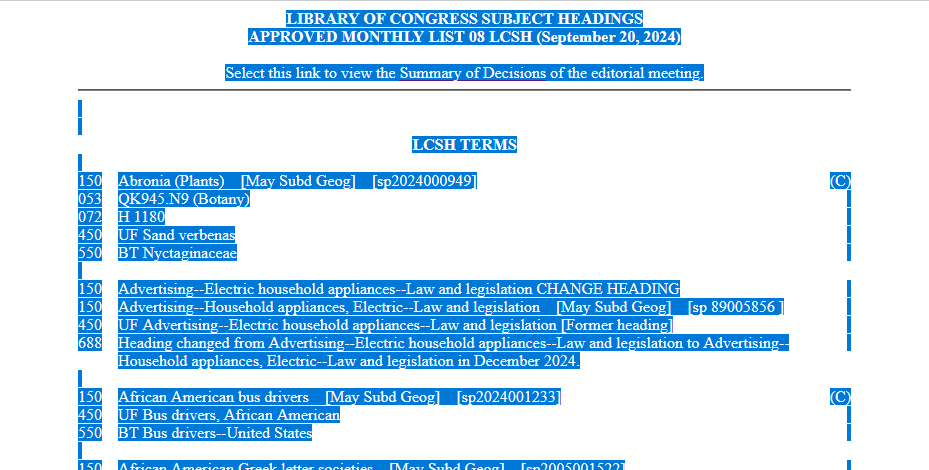
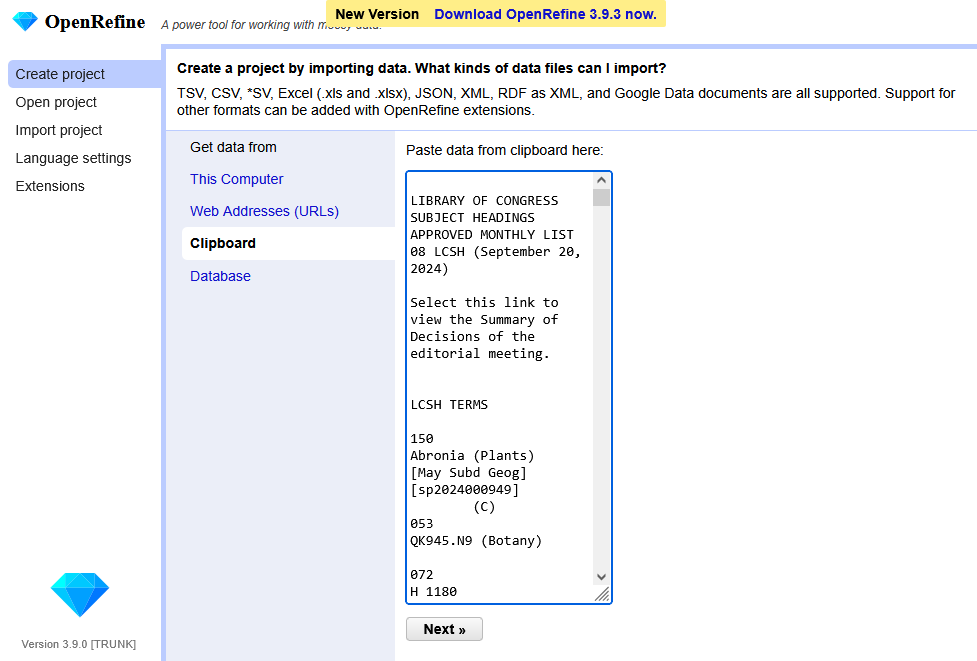
<p>First, navigate to a monthly list that you are interested in, and simply use Ctrl-A and Ctrl-C to copy all of the text on that page. Then create a new project in OpenRefine. Use the “Clipboard” option to get data, and paste in the text you copied from the monthly list.</p>

<p><img src="/images/2025/monthly-list-select-all.PNG" alt="Screenshot of a Monthly List with all text highlighted, ready to be copied" /> <em>Data ready to be copied</em></p>

<p><img src="/images/2025/openrefine-clipboard.PNG" alt="Screenshot of OpenRefine in the middle of creating a new project, showing text pasted into the Clipboard area" /> <em>And now that data pasted into OpenRefine</em></p>

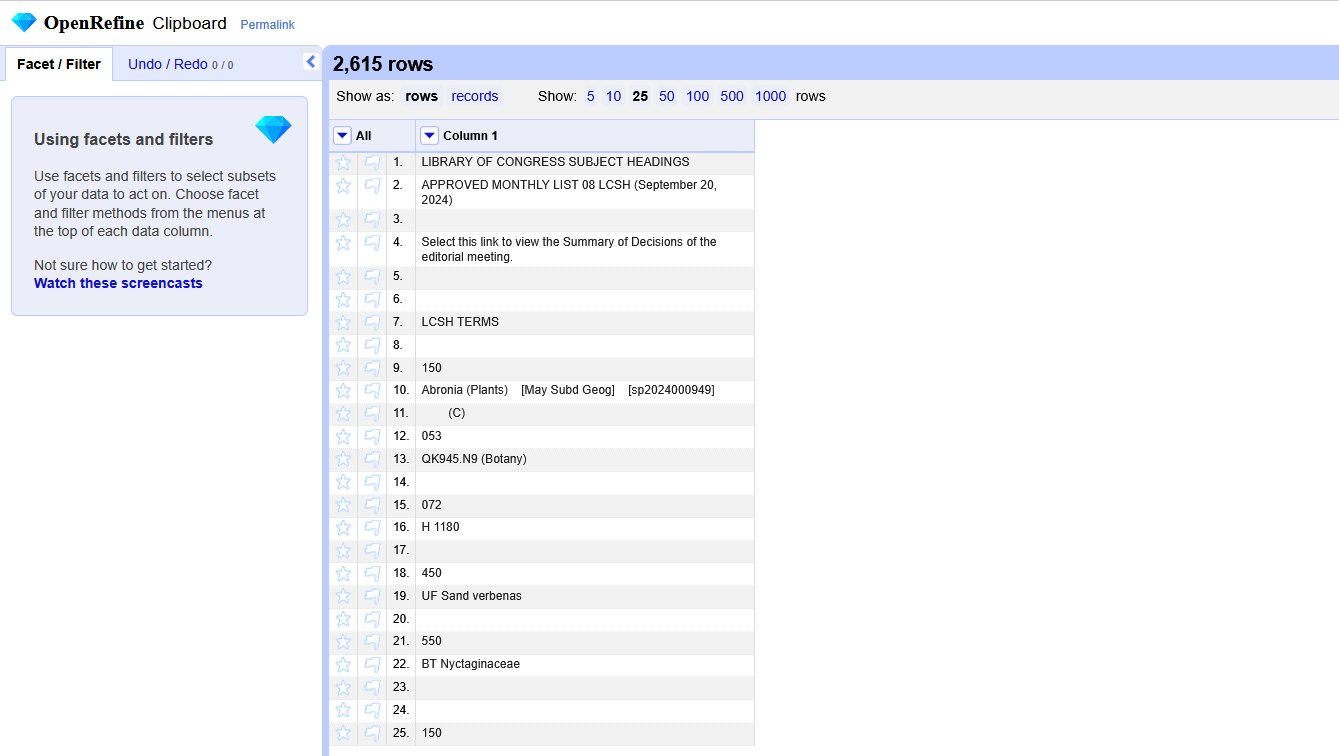
<p>Here’s how the data will look when you first create the project in OpenRefine:</p>

<p><img src="/images/2025/openrefine-new-project.PNG" alt="Screenshot of OpenRefine showing a project with many empty rows and rows with data spread across multiple cells" /></p>

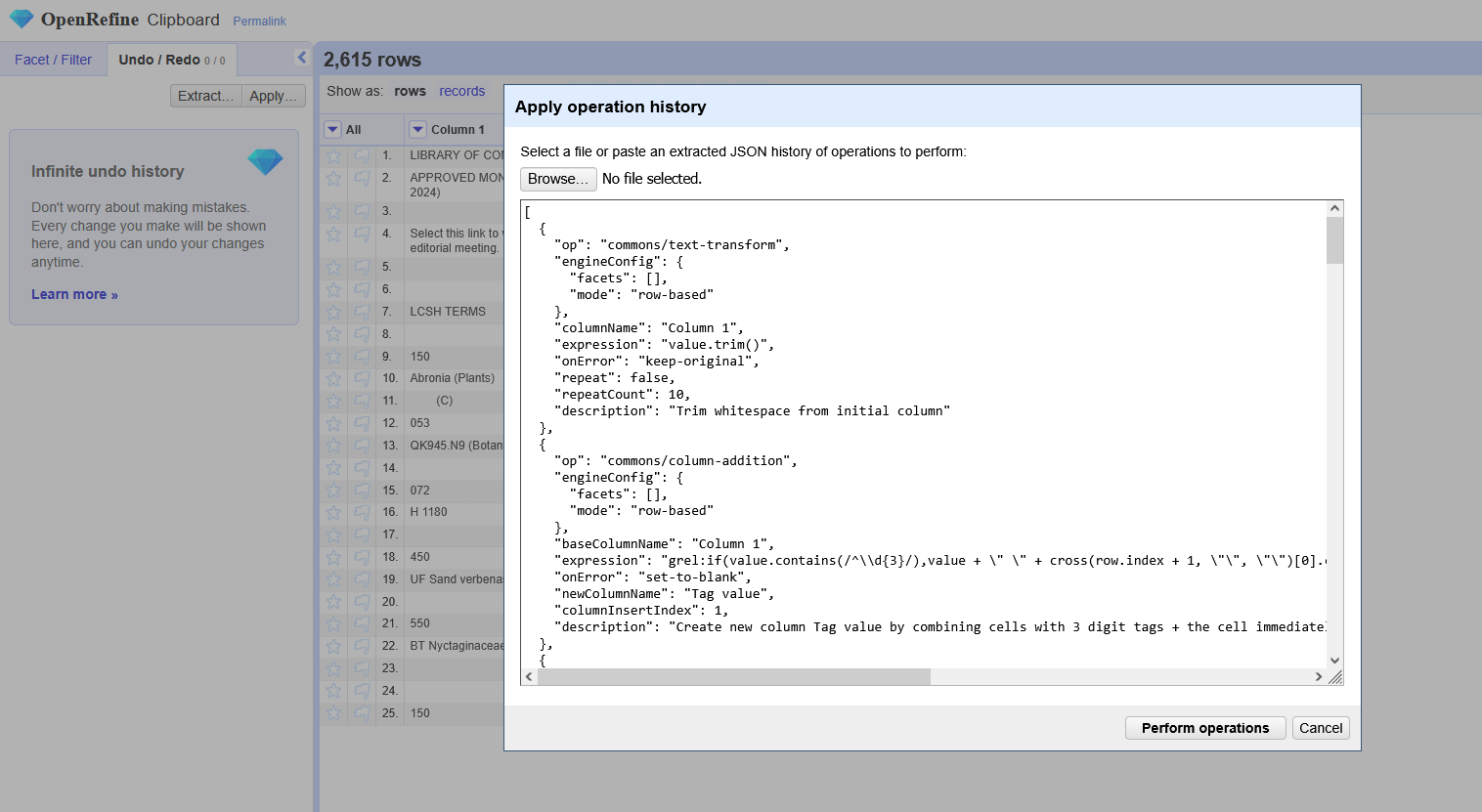
<p>Next, copy the OpenRefine operation history and apply it to your project. (To do that, go to “Undo/Redo” in the upper left, select “Apply…”, and then paste in the JSON. You an also upload it as a file, but I usually just paste it in.)</p>

<p><img src="/images/2025/openrefine-apply-operation-history.PNG" alt="Screenshot of OpenRefine with the &quot;Apply Operation History&quot; window open and lots of JSON pasted in" /></p>

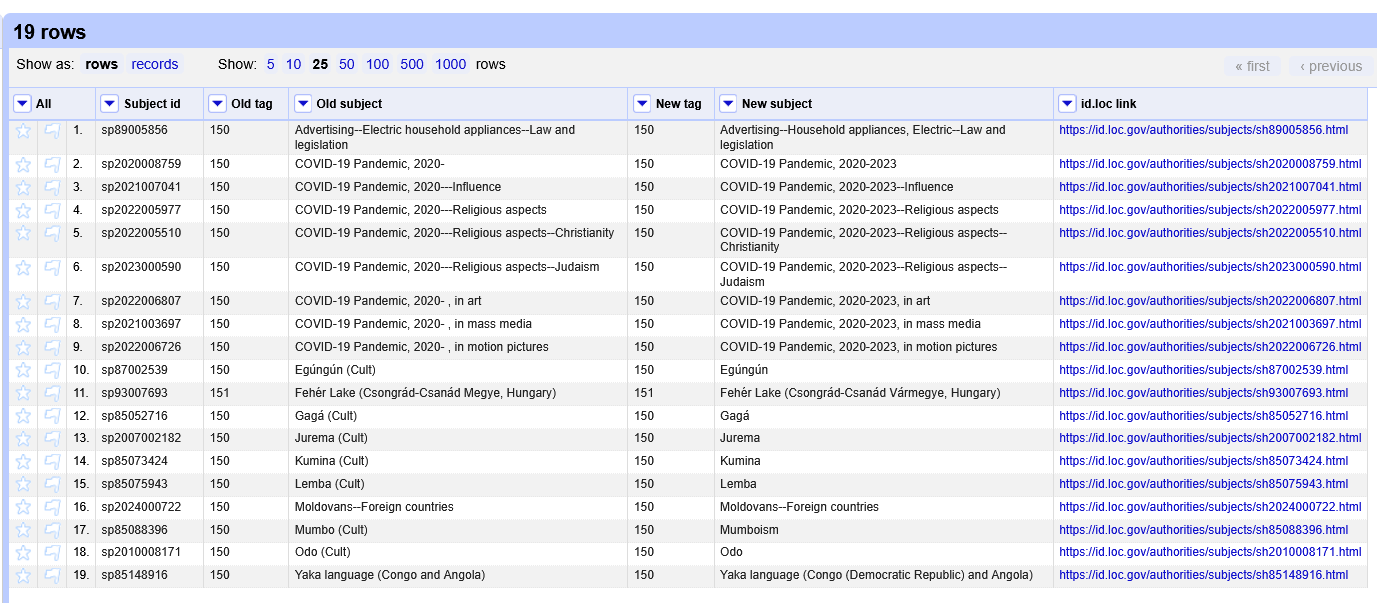
<p>And voila! Now you have a list of all of the subjects that have been changed, which can be exported as a CSV, spreadsheet, etc. It includes the subject term and MARC tag of both the old and new versions of the subject heading, as well as the identifier for the subject heading and a link to the term in id.loc.gov. (I can’t think of a scenario where the MARC tag would change between the old and new versions, but I included both just in case.)</p>

<p><img src="/images/2025/openrefine-final-product.PNG" alt="Screenshot of OpenRefine, now showing a more structured spreadsheet view with columns called Subject id, Old tag, Old subject, New tag, New subject, and id.loc link" /></p>

<p>I tried to comment each operation in the JSON file to provide a bit more context about what it is doing. The trickiest part was figuring out how to access the cell below a given cell in OR, but the cross function came to my rescue.</p>

<p>Currently, the operations only work for LCSH terms, not CYAC, LCDGT, etc. It might work partially for those other vocabularies, but the ID and link columns definitely won’t work. I’d like to play around with it some more to be able to parse what vocabulary each term is part of, but since I don’t work with those vocabularies regularly, it might not be a high priority.</p>

<p>I’d love to hear if this is helpful to anyone else, or if you know of more efficient ways to get this kind of data from LCSH!</p>]]></content><author><name>admin</name></author><category term="cataloging" /><category term="LCSH" /><category term="Library of Congress" /><category term="subject headings" /><category term="OpenRefine" /><summary type="html"><![CDATA[I wanted a quick and easy way that I could transform LCSH Monthly Approved Lists into a more structured list of what headings have been changed. So I created a reusable set of OpenRefine operations to do just that.]]></summary></entry><entry><title type="html">Getting LCC labels for a MARC record analysis project</title><link href="http://elliotdwilliams.github.io/getting-lcc-labels-for-a-marc-record-analysis-project/" rel="alternate" type="text/html" title="Getting LCC labels for a MARC record analysis project" /><published>2023-10-05T21:55:00+00:00</published><updated>2023-10-05T21:55:00+00:00</updated><id>http://elliotdwilliams.github.io/getting-lcc-labels-for-a-marc-record-analysis-project</id><content type="html" xml:base="http://elliotdwilliams.github.io/getting-lcc-labels-for-a-marc-record-analysis-project/"><![CDATA[<!-- wp:paragraph -->
<p>Hello! I'm back with another edition of "Elliot writes out the process for how I did something, mostly for myself, but puts on the internet in case anyone else finds it useful." This one started out as one thing (counting percentages of MARC records in a set that contain a given field) and morphed into another thing, as well (use OpenRefine to add labels to LCC class numbers).</p>
<!-- wp:paragraph -->
<!--more-->

<!-- wp:paragraph -->
<p>I've been discussing with one of my colleagues ways to enrich our MARC record for musical scores to improve their searchability in the catalog.  One thing that we're interested in is including more 505 table of contents notes, particularly for collections or anthologies of printed music.  There are a lot of reasons that would be nice, but a big one is that collections are one of the main sources in our collection for works by contemporary composers, composers of color, and women composers.  </p>
<!-- /wp:paragraph -->

<!-- wp:paragraph -->
<p>As we figure out if that's worthwhile and how we might approach it, I wanted to do some analysis of our notated music records to see how many have 505 notes.  I wanted to break it down by LCC classification, since we're thinking that that might be a helpful way of identifying priority areas and chunking the project into manageable pieces.  So here's what I did:</p>
<!-- /wp:paragraph -->

<!-- wp:paragraph -->
<p><em>Getting the data</em></p>
<!-- /wp:paragraph -->

<!-- wp:list {"ordered":true} -->
<ol><!-- wp:list-item -->
<li>In Alma, did an advanced search for all physical notated music records, then exported those MARC records.<!-- wp:list -->
<ul><!-- wp:list-item -->
<li>There were a total of 12,949 records, which is a lot but manageable for what I was hoping to do.</li>
<!-- /wp:list-item --></ul>
<!-- /wp:list --></li>
<!-- /wp:list-item -->

<!-- wp:list-item -->
<li>Used MarcEdit to export the fields I care about to a tab-delimited file: 001, 245, 050, 090, 505<!-- wp:list -->
<ul><!-- wp:list-item -->
<li>Much later in the process, I realized it would have been helpful to include the 035 field at this stage.  Whoops.</li>
<!-- /wp:list-item --></ul>
<!-- /wp:list --></li>
<!-- /wp:list-item --></ol>
<!-- /wp:list -->

<!-- wp:paragraph -->
<p><em>Processing in OpenRefine and class number cleanup</em></p>
<!-- /wp:paragraph -->

<!-- wp:list {"ordered":true,"start":3} -->
<ol start="3"><!-- wp:list-item -->
<li>Imported the tab-delimited data into OpenRefine</li>
<!-- /wp:list-item -->

<!-- wp:list-item -->
<li>Created a new column called "TOC?", where I entered either yes or no based on the presence of a 505 field in the record (using OR's "Facet by blank" facet)</li>
<!-- /wp:list-item -->

<!-- wp:list-item -->
<li>Combined call number data from 050 and 090, and do some preliminary cleanup (mostly removing indicators/subfields and stray extra characters from the front)<!-- wp:list -->
<ul><!-- wp:list-item -->
<li>At this point, I realized it would have been better to have the call numbers from the holdings records, rather than the bib records, but that would have been more complicated to get out of Alma so I decided to go with what I had.  Good enough for this kind of exploratory analysis.</li>
<!-- /wp:list-item --></ul>
<!-- /wp:list --></li>
<!-- /wp:list-item -->

<!-- wp:list-item -->
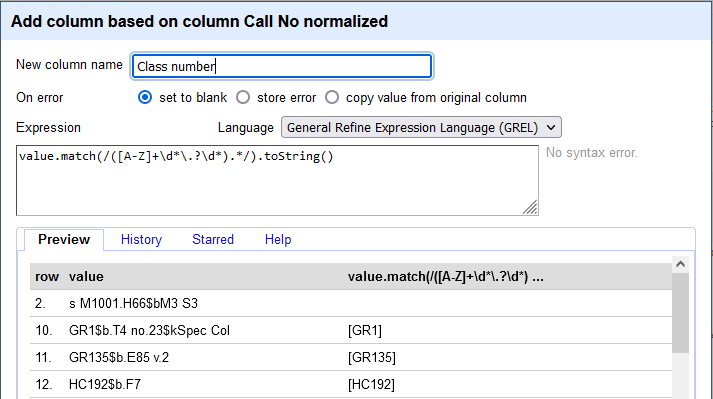
<li>Used a regular expression to create a new column with just the first part of the call number, up to the first period that comes before a letter (hoping to get just the base classification number)<!-- wp:list -->
<ul><!-- wp:list-item -->
<li><code>value.match(/[A-Z]+*\.?\d*).*/).toString()</code></li>
<!-- /wp:list-item --></ul>
<!-- /wp:list --></li>
<!-- /wp:list-item --></ol>
<!-- /wp:list -->

<p><img src="/images/2023/CallNo-regex.png" alt="Screenshot of an OpenRefine window for &quot;Add column based on column Call No normalized&quot;." /> <em>Regex for getting the base class number</em></p>

<!-- wp:paragraph -->
<p><em>Getting more info about class numbers</em></p>
<!-- /wp:paragraph -->

<!-- wp:list {"ordered":true,"start":7} -->
<ol start="7"><!-- wp:list-item -->
<li>Now I had the basic class number for each record. But I'm not super familiar with music class numbers, so I wanted to include the label for each number. I knew that on our old friend id.loc.gov, you can get data about each LC class in a variety of data formats, and you can construct the URL using the class number itself, e.g. <a href="https://id.loc.gov/authorities/classification/ML3551.html">https://id.loc.gov/authorities/classification/ML3551.html</a>.&nbsp; I first tried to work with the JSON versions, but I’m more comfortable with XML, so ended up using the RDF/XML format, e.g. <a href="https://id.loc.gov/authorities/classification/ML3551.rdf">https://id.loc.gov/authorities/classification/ML3551.rdf</a></li>
<!-- /wp:list-item -->

<!-- wp:list-item -->
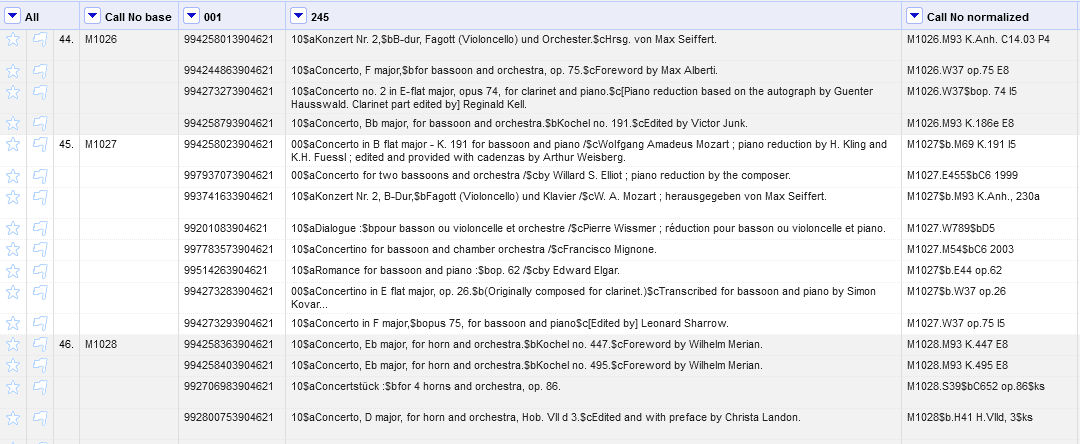
<li>Before making a bunch of URL requests to the Library of Congress, I used OpenRefine’s records mode and blank down feature, to make sure that I only had to make one request for each class number.&nbsp; So only 757 URL requests, instead of 12,949.<!-- wp:list -->
<ul><!-- wp:list-item -->
<li>I think I picked up this tip from a <a href="https://programminghistorian.org/en/lessons/fetch-and-parse-data-with-openrefine#example-2-url-queries-and-parsing-json">Programming Historian tutorial</a> I was using to help figure out this process.</li>
<!-- /wp:list-item --></ul>
<!-- /wp:list --></li>
<!-- /wp:list-item --></ol>
<!-- /wp:list -->

<p><img src="/images/2023/CallNo-recordsMode.png" alt="Screenshot of OpenRefine in records mode, showing three records with multiple rows each, with the column &quot;Call No base&quot; as the first column" /> <em>Records mode, always a lifesaver</em></p>

<!-- wp:list {"ordered":true,"start":9} -->
<ol start="9"><!-- wp:list-item -->
<li>Okay, now the good stuff: I created a new column in OpenRefine by fetching URLs based on Call No base column, using expression <code>'https://id.loc.gov/authorities/classification/'+value+'.rdf'</code>.&nbsp; Now I have a column full of XML!</li>
<!-- /wp:list-item -->

<!-- wp:list-item -->
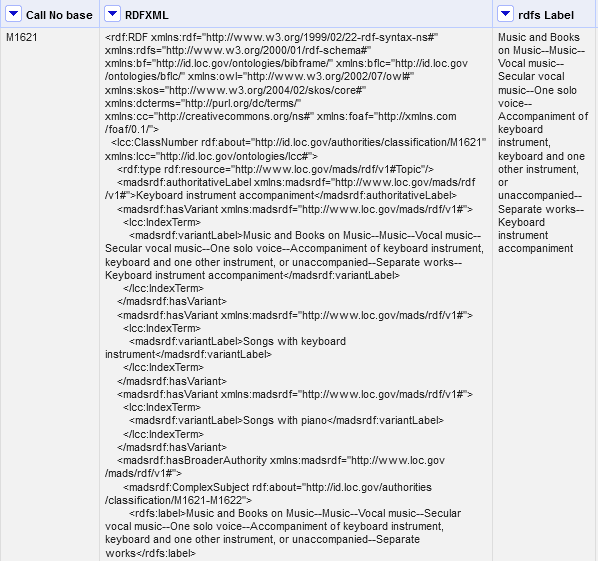
<li>Looking at the RDF/XML, I decided I wanted the &lt;rdfs:label&gt; field that contained the full chain of where this class number fits in the classification hierarchy.&nbsp; The problem is, though, that there are multiple &lt;rdfs:label&gt; elements in the output – so using just plain parseXml().select(’rdfs|label’) wouldn’t work.&nbsp; I want the instance of that element that is directly under the &lt;lss:ClassNumber&gt; element.&nbsp; So I looked at the <a href="https://jsoup.org/cookbook/extracting-data/selector-syntax">documentation for Jsoup</a> (I know, what an idea, right?), and figured out I could use <code>value.parseXml().select("rdf|RDF &gt; lcc|ClassNumber &gt; rdfs|label")[0].toString()</code> to get exactly the element I wanted.<!-- wp:list -->
<ul><!-- wp:list-item -->
<li>(This makes it sound a lot more straight-forward than it actually was.  Imagine lots of flailing around and frantic googling at this stage, particularly when I was trying to use JSON results before switching to XML.)</li>
<!-- /wp:list-item -->

<!-- wp:list-item -->
<li>Pro-tip that I learned in this process: if your XML elements have namespaces, you have to enter them in the select expression as "rdfs|label", instead of "rdfs:label".</li>
<!-- /wp:list-item --></ul>
<!-- /wp:list --></li>
<!-- /wp:list-item --></ol>
<!-- /wp:list -->

<p><img src="/images/2023/CallNo_rdfxml.png" alt="Screenshot of three columns in OpenRefine. First column is labeled &quot;Call No base&quot;, and the value is &quot;M1621&quot;. Second column is labeled &quot;RDFXML&quot; and has a lot of XML data in it. Third column is labeled &quot;rdfs Label&quot;, and the value is &quot;Music and Books on Music--Music--Vocal music--Secular vocal music--One solo voice--Accompaniment of keyboard instrument, keyboard and one other instrument, or unaccompanied--Separate works--Keyboard instrument accompaniment&quot;" /> <em>Class number, retrieved XML, and the full hierarchy label for that number</em></p>
<!-- wp:list {"ordered":true,"start":11} -->
<ol start="11"><!-- wp:list-item -->
<li>Ta-dah!&nbsp; Now I have a column with the full LCC description for each class number in my dataset.&nbsp; I used fill down in OpenRefine to add the class number and label to all of the rows.</li>
<!-- /wp:list-item -->

<!-- wp:list-item -->
<li>There were about 7 records where the process didn’t work because the data wasn’t structured normally or the call number was missing from the bib, so I added those manually.</li>
<!-- /wp:list-item --></ol>
<!-- /wp:list -->

<!-- wp:paragraph -->
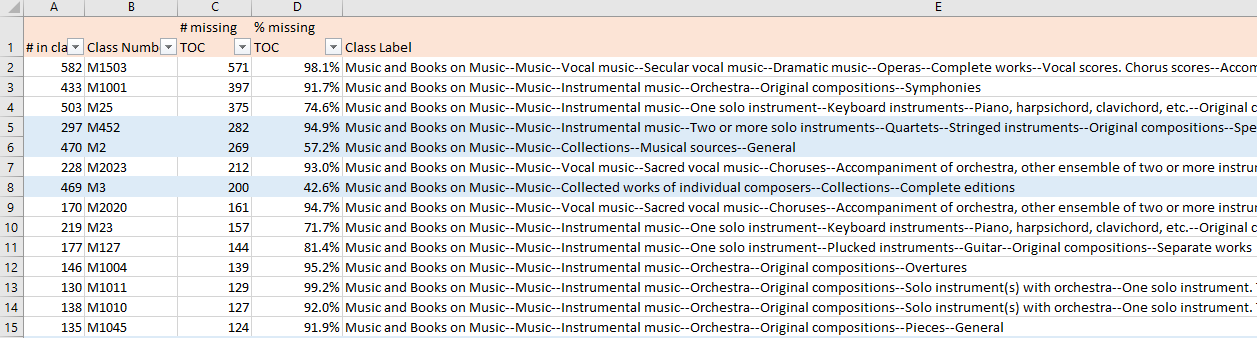
<p>At this point, I thought I might be fancy and do something with pandas (which I'm very much a beginner with) to count the number of records without a 505 per class number.  But I decided I knew how to do what I wanted to in Excel, so I just did that instead. &#x1f937;  I used some simple deduping and COUNTIF formulas to get the number of records per class number, and the number in each class number that do not have a 505 field.  And it includes the full classification hierarchy label for each number, which is helpful.  That allowed me to highlight all of the rows with "Collection" in the classification label, which has already been helpful in pinpointing some class numbers to explore in more depth.</p>
<!-- /wp:paragraph -->

<p><img src="/images/2023/CallNo-excel.png" alt="Screenshot of an Excel spreadsheet, showing columns labeled # in class, Class Number, # missing TOC, % missing TOC, and Class Label." /> <em>The final product in Excel</em></p>]]></content><author><name>admin</name></author><category term="cataloging" /><category term="Cataloging" /><category term="LCC" /><category term="Library of Congress" /><category term="MARC" /><category term="OpenRefine" /><summary type="html"><![CDATA[Hello! I'm back with another edition of "Elliot writes out the process for how I did something, mostly for myself, but puts on the internet in case anyone else finds it useful." This one started out as one thing (counting percentages of MARC records in a set that contain a given field) and morphed into another thing, as well (use OpenRefine to add labels to LCC class numbers).]]></summary></entry><entry><title type="html">Searching for unique subject headings in DPLA</title><link href="http://elliotdwilliams.github.io/searching-for-unique-subject-headings-in-dpla/" rel="alternate" type="text/html" title="Searching for unique subject headings in DPLA" /><published>2023-08-18T22:08:00+00:00</published><updated>2023-08-18T22:08:00+00:00</updated><id>http://elliotdwilliams.github.io/searching-for-unique-subject-headings-in-dpla</id><content type="html" xml:base="http://elliotdwilliams.github.io/searching-for-unique-subject-headings-in-dpla/"><![CDATA[<!-- wp:paragraph -->
<p>I’ve been thinking about subject headings a lot lately (as one does), and it inspired me to return to some work that I had started doing while I was at TDL, thinking about subject heading uniqueness in <a href="https://dp.la" target="_blank" rel="noreferrer noopener">DPLA</a>.</p>
<!-- /wp:paragraph -->
<!--more-->

<!-- wp:paragraph -->
<p>One of the things that I’ve noticed in my own metadata work, and that was confirmed for me when I was looking at other people’s metadata as part of my TDL job, is that subject headings for digital collections are often very specific and detailed. On top of that, there aren’t good rules for applying subject headings to digital collections items (in the way that there are for MARC cataloging), and the people who create digital collections metadata often don’t have a lot of expertise in LCSH structure and application rules (no shade, it’s a very niche and abstruse area to have expertise in). All of that combined means that I have a strong suspicion that a lot of subject terms used in a given institution’s digital collections are unique to that institution.</p>
<!-- /wp:paragraph -->

<!-- wp:paragraph -->
<p>That’s all well and good within that institution’s repository, but when you start sharing metadata with an aggregator like DPLA, I think that starts to become more of a problem. If we assume that one of the purposes of applying subject headings is to link similar items together, then having subject headings that are unique to an institution don’t serve that purpose, or the purpose of aggregation, very well.</p>
<!-- /wp:paragraph -->

<!-- wp:paragraph -->
<p>So I wanted to find a way to easily identify what subject headings for a given institution are unique in DPLA. I was inspired a lot by the <a href="https://doi.org/10.1108/EL-11-2020-0317" target="_blank" rel="noreferrer noopener">research that Mark Phillips and Hannah Tarver have published around metadata record graphs</a>, also looking at subject headings in DPLA. Their research is a lot more detailed and uses network analysis to explore how subject headings link records together within a large corpus. My goal was more modest: as a metadata creator, I want to see what subject headings in my institution are unique, to potentially inform metadata creation practice at my library.</p>
<!-- /wp:paragraph -->

<!-- wp:paragraph -->
<p>As I do in most situations, I turned to my faithful friends: python and the DPLA API. (Can we talk for a minute about the DPLA API, and how simple and easy to use and well-documented it is? It’s really great.) I ran through a couple of iterations of the script before I settled on a method that I like. Here’s the script I came up with: <a href="https://github.com/elliotdwilliams/dpla-subject-search/blob/main/dpla-uniq-subjects.py" target="_blank" rel="noreferrer noopener">https://github.com/elliotdwilliams/dpla-subject-search/blob/main/dpla-uniq-subjects.py</a> (In that Github repository, there are a few other variations that do parts of that work, if you’re looking for something other than strictly unique subject terms.)</p>
<!-- /wp:paragraph -->

<!-- wp:paragraph -->
<p>Basically, the script takes a given contributing institution in DPLA, searches for that institution, and grabs a list of the most common subject terms in that institution’s contributed records. (You can get up to 2,000 subject terms, because that is the limit that the API will return as a facet.) Then, it searches for each of those subject terms in DPLA, and checks to see if it is used by only one institution. If it is, that subject term is written to an output file. It also generates a percentage for how many of the subject terms it searched are unique.</p>
<!-- /wp:paragraph -->

<!-- wp:paragraph -->
<p>I ran it today for <a href="https://dp.la/search?provider=%22UTSA+Libraries+Special+Collections%22&amp;page=1" target="_blank" rel="noreferrer noopener">UTSA Libraries</a>, and of our top 1000 subject headings in DPLA, 323 are unique to us. Which, honestly, I feel like a 32% uniqueness percentage is pretty good! Looking at the list, a lot of them are unique because they are about San Antonio, which makes sense (either local places like “West Side (San Antonio, Tex.)” or pre-coordinated strings like “Lesbians--Texas--San Antonio”). There are also quite a few that show up as unique because of some idiosyncratic formatting choices that have been made in the past. There are some headings, though, which I wouldn’t have expected to be unique in DPLA, like “Immigrants, English” - offhand, that looks to me like a correctly formatted LCSH term, but I’m definitely going to double-check. I also spotted a couple of typos, which now that I know about them I can fix them!</p>
<!-- /wp:paragraph -->

<!-- wp:paragraph -->
<p>I wouldn’t call it a groundbreaking metadata analysis tool by any means, but I’m glad to have this script available for exploring subject terms in DPLA.</p>
<!-- /wp:paragraph -->]]></content><author><name>admin</name></author><category term="DPLA" /><category term="metadata" /><category term="Metadata" /><category term="python" /><category term="subject headings" /><summary type="html"><![CDATA[I’ve been thinking about subject headings a lot lately (as one does), and it inspired me to return to some work that I had started doing while I was at TDL, thinking about subject heading uniqueness in DPLA.]]></summary></entry><entry><title type="html">Batch download LCSH files</title><link href="http://elliotdwilliams.github.io/batch-download-lcsh-files/" rel="alternate" type="text/html" title="Batch download LCSH files" /><published>2021-09-17T21:53:00+00:00</published><updated>2021-09-17T21:53:00+00:00</updated><id>http://elliotdwilliams.github.io/batch-download-lcsh-files</id><content type="html" xml:base="http://elliotdwilliams.github.io/batch-download-lcsh-files/"><![CDATA[<!-- wp:paragraph -->
<p>It's been a minute since I wrote anything on this here blog, but I was working through a process today that I wanted to document and thought that other folks might be interested in.</p>
<!-- /wp:paragraph -->

<!-- wp:paragraph -->
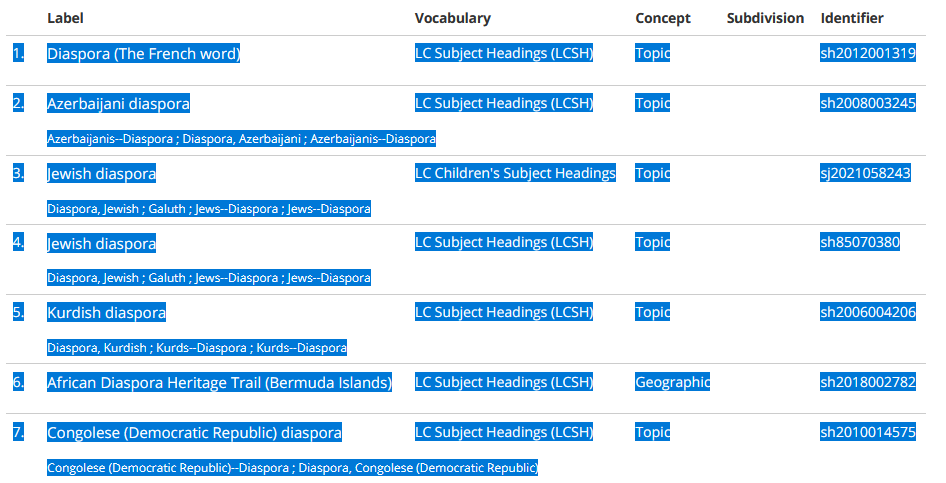
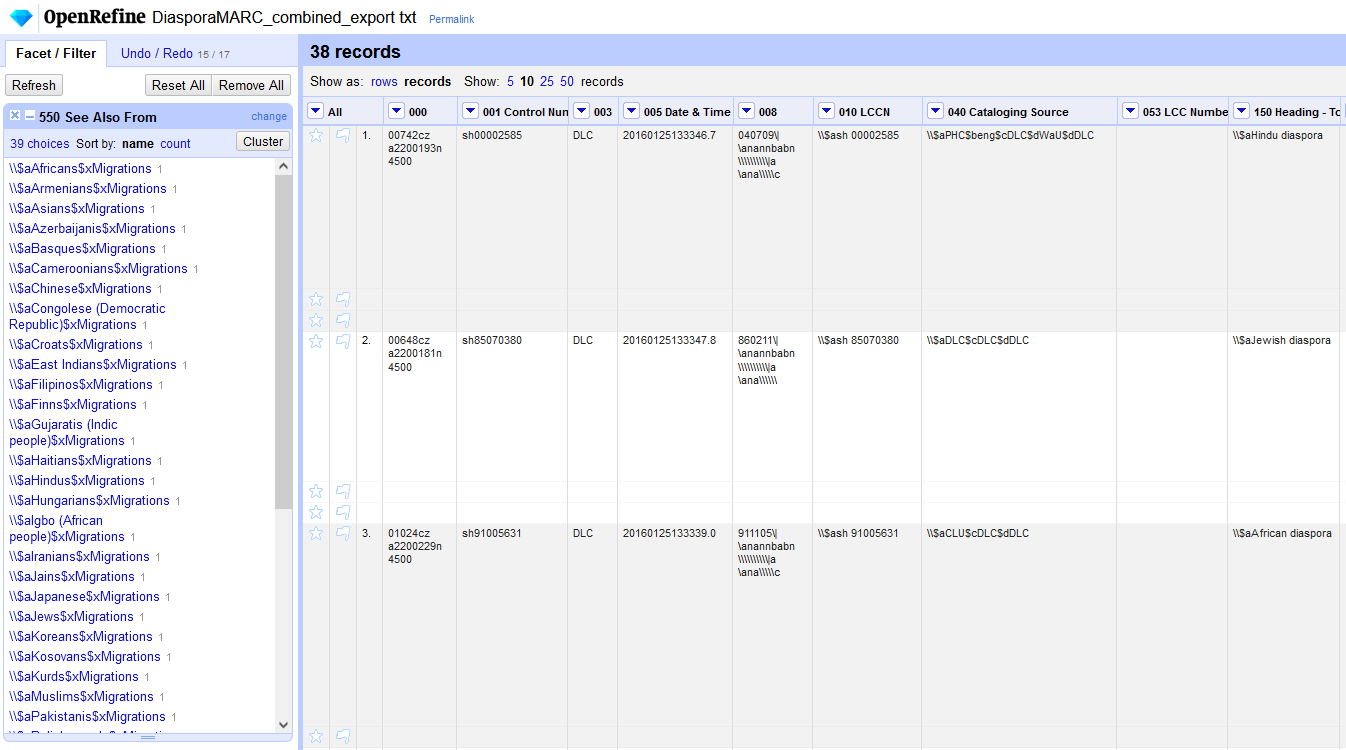
<p>This week, a group of coworkers and I were discussing whether there is an LCSH for "Cuban diaspora" (there is not), and whether there should be (we think that might be useful, and might eventually want to work on a proposal).  There are a handful of other LCSH terms for "[blank] diaspora", and I wanted to be able to view them all at once, rather than paging through them individually in ClassWeb.  That way I could compare the See From and See Also From references, the public notes, and the works cataloged, to get a sense of what the format and structure of this group of subject headings is.  So basically, what I wanted to do was to download a batch of LCSH records in a format that I could open in OpenRefine to examine.</p>
<!-- /wp:paragraph -->
<!--more-->

<!-- wp:paragraph -->
<p>LCSH records are available in a variety of formats from <a rel="noreferrer noopener" href="https://id.loc.gov/authorities/subjects.html" target="_blank">id.loc.gov</a>, so I know the records are there on the web.  The records are available in MARCXML, JSON, RDF, and a number of other flavors.  I just needed a way to identify the ones I wanted and download them in batch.</p>
<!-- /wp:paragraph -->

<!-- wp:paragraph -->
<p>Here's what I ended up doing.  As always, I'm sure there are other, probably faster or simpler ways to do this, but this process worked for what I wanted and used tools that I already knew how to use:</p>
<!-- /wp:paragraph -->

<!-- wp:list {"ordered":true} -->
<ol><li>Search LCSH for "diaspora" in <a rel="noreferrer noopener" href="https://id.loc.gov/authorities/subjects.html" target="_blank">id.loc.gov</a></li><li>Literally copy and paste from the search results into a spreadsheet.  There were 55 total, so it was only 3 pages of results that I needed to copy.</li></ol>
<!-- /wp:list -->

<p><img src="/images/2021/lcsh-diaspora.png" alt="Screenshot of a list of search results of LCSH terms, with the information highlighted to be copied and pasted" /> <em>LSCH search results, ready to be copied</em></p>

<!-- wp:list {"ordered":true,"start":3} -->
<ol start="3"><li>In the spreadsheet, remove the subjects I'm not interested in, isolate the identifiers (e.g. sh2006004206), and save the list of identifiers as a text file.  Now I have a list of all of the identifiers for the relevant subject headings.</li><li>Now the part that took a bit more figuring out: Use <a href="https://curl.se/docs/manpage.html" data-type="URL" data-id="https://curl.se/docs/manpage.html">curl</a> to download the files in bulk.  Here's the command I used:</li></ol>
<!-- /wp:list -->

<blockquote>
  <p><code>in $(cat Desktop/DiasporaSH_ids.txt); do curl -o “Desktop/diaspora/$ID.xml” “https://id.loc.gov/authorities.subjects/$ID.marcxml.xml”; done</code></p>
</blockquote>

<!-- wp:paragraph -->
<p>Basically, what that does is read the list of identifiers, copies them into a variable ($ID), then runs a curl command using that variable to build the URL and saves the output, in this case as an XML file.  I use GitBash as my shell for running commands like this.  As usual, it took me some time to figure out how to get the "for" loop to work (it always takes me a while to remember how to structure it properly).  And because I use a windows computer, I also had to remove the carriage return characters at the end of the DiasporaSH_ids.txt file, so I’d stop getting an “Illegal characters found in URL” message.  I used <a rel="noreferrer noopener" href="https://linux.die.net/man/1/dos2unix" data-type="URL" data-id="https://linux.die.net/man/1/dos2unix" target="_blank">dos2unix</a> to do that.</p>
<!-- /wp:paragraph -->

<!-- wp:list {"ordered":true,"start":5} -->
<ol start="5"><li>Now I have a folder full of MARCXML files!</li><li>Repeat the curl command for RDF and JSON files, or other formats as needed.</li></ol>
<!-- /wp:list -->

<!-- wp:paragraph -->
<p>For what I wanted to do today, the MARCXML turned out to be the most useful.  I went through a whole process using MarcEdit to convert them into .MRC files and then export the records to tab-delimited text, which I then loaded into OpenRefine.  I'm sure another tool could have done that more easily (probably pymarc?), but I knew I could get it done with MarcEdit, and just went with that.</p>
<!-- /wp:paragraph -->

<!-- wp:paragraph -->
<p>And voila, I had what I wanted!</p>
<!-- /wp:paragraph -->

<p><img src="/images/2021/OpenRefine-diaspora.png" alt="Screenshot of OpenRefine interface, showing a facet on the left and exported MARC record data in the main view." /></p>]]></content><author><name>admin</name></author><category term="cataloging" /><category term="Cataloging" /><category term="command line" /><category term="Library of Congress" /><category term="technology" /><summary type="html"><![CDATA[It's been a minute since I wrote anything on this here blog, but I was working through a process today that I wanted to document and thought that other folks might be interested in. This week, a group of coworkers and I were discussing whether there is an LCSH for "Cuban diaspora" (there is not), and whether there should be (we think that might be useful, and might eventually want to work on a proposal). There are a handful of other LCSH terms for "[blank] diaspora", and I wanted to be able to view them all at once, rather than paging through them individually in ClassWeb. That way I could compare the See From and See Also From references, the public notes, and the works cataloged, to get a sense of what the format and structure of this group of subject headings is. So basically, what I wanted to do was to download a batch of LCSH records in a format that I could open in OpenRefine to examine.]]></summary></entry><entry><title type="html">RDA and religion</title><link href="http://elliotdwilliams.github.io/rda-and-religion/" rel="alternate" type="text/html" title="RDA and religion" /><published>2018-08-17T21:27:00+00:00</published><updated>2018-08-17T21:27:00+00:00</updated><id>http://elliotdwilliams.github.io/rda-and-religion</id><content type="html" xml:base="http://elliotdwilliams.github.io/rda-and-religion/"><![CDATA[<p>I’ve been feeling curious about the number of rules in RDA that deal specifically and explicitly with religion.  Because I’m generally interested in the development and history of cataloging standards, the number of religion-specific rules seems notable.  Why is religion given so much attention, and are there historical reasons for that? I’m not trying to be critical of the frequency with which religion appears in RDA - in some ways, I think it makes perfect sense - but I do find it kind of intriguing.
<!--more--></p>

<p>As a way to start thinking more about that and starting to wrap my head around it, I spent some time pulling together a list of all of the RDA rules that deal with religious works or religious bodies.  I used the current version of the RDA Toolkit (not the Beta Toolkit) and did searches for “religion”, “religious”, and “church.” I decided to only include rules if the instructions are specific to a religious body or text.  I didn’t include if a religious body or text was used as an example, but the rule does not specify to treat it differently (although that would be an interesting addendum). I also didn’t include rules that only include a reference to another rule that is specific to religious bodies or texts.</p>

<p>The list is currently stored in a <a href="https://docs.google.com/document/d/18C_yzmhnMV3yJrhscXmjrnuR4aJnSURBLfQ6dvma7FM/edit?usp=sharing">Google Doc</a>. I won’t guarantee that this list is comprehensive.  I may have missed some rules! Please let me know if you can think of any that should be included, or any other search terms that might be interesting.</p>

<p>I have a few ideas of what to do with this next, but even just this list of rules is interesting in and of itself.  It helps me get a sense of when and why religion appears in RDA, as well as what religions and faith traditions are most explicitly discussed.</p>]]></content><author><name>admin</name></author><category term="Cataloging" /><category term="cataloging history" /><category term="RDA" /><category term="religion" /><summary type="html"><![CDATA[I’ve been feeling curious about the number of rules in RDA that deal specifically and explicitly with religion.  Because I’m generally interested in the development and history of cataloging standards, the number of religion-specific rules seems notable.  Why is religion given so much attention, and are there historical reasons for that? I’m not trying to be critical of the frequency with which religion appears in RDA - in some ways, I think it makes perfect sense - but I do find it kind of intriguing.]]></summary></entry><entry><title type="html">I made a twitter bot!</title><link href="http://elliotdwilliams.github.io/i-made-a-twitter-bot/" rel="alternate" type="text/html" title="I made a twitter bot!" /><published>2018-07-06T02:25:00+00:00</published><updated>2018-07-06T02:25:00+00:00</updated><id>http://elliotdwilliams.github.io/i-made-a-twitter-bot</id><content type="html" xml:base="http://elliotdwilliams.github.io/i-made-a-twitter-bot/"><![CDATA[<blockquote class="twitter-tweet" data-lang="en"><p dir="ltr" lang="en">'People taking a gondola ride along the Coral Gables Waterway. Coral Gables, Florida'
"Recognizing the importance of having a luxury resort hotel in the city, George Merrick turned to John McEntee Bowman, President o...'<a href="https://t.co/27MqoSFJtU">https://t.co/27MqoSFJtU</a></p>
— SSDNbot&#x2600;&#x1f334;&#x1f40a; (@SSDNbot) <a href="https://twitter.com/SSDNbot/status/1007986372983042049?ref_src=twsrc%5Etfw">June 16, 2018</a></blockquote>
<!--more-->

<p>I love twitter bots. There are some really cool ones doing interesting things with cultural heritage materials:</p>
<ul>
 	<li><a href="http://www.twitter.com/NYPLEmoji">@NYPLEmoji</a>, which responds to emojis with matching items from NYPL’s collections</li>
 	<li><a href="http://www.twitter.com/pokemon_nypl" target="_blank" rel="noopener">@pokemon_nypl</a>, which tweets collections images with Pokemon added to them</li>
 	<li><a href="http://www.twitter.com/PDcutup" target="_blank" rel="noopener">@PDcutup</a>, which creates collages out of two public domain images from two different institutions based on similarity in their titles</li>
 	<li><a href="http://www.twitter.com/leia_quotes" target="_blank" rel="noopener">@leia_quotes</a>, which tweets all of Princess Leia’s lines of dialogue (not cultural heritage related, but I still love it)</li>
</ul>
<p>I’ve been slowly working my way through the Codecademy Python course, and I thought that a twitter bot would be a good chance to practice my Python coding skills. At work, I’ve been working a lot with a bunch of other amazing people on getting the <a href="https://sunshinestatedigitalnetwork.wordpress.com/" target="_blank" rel="noopener">Sunshine State Digital Network</a> (SSDN) established as the DPLA hub for the state of Florida, and as part of that, I’ve had the chance to play around with the <a href="https://pro.dp.la/developers/api-basics" target="_blank" rel="noopener">DPLA API</a>. So, combining all of those things, I decided to make a twitter bot that randomly tweets out items that SSDN has contributed to DPLA. It seemed like a good project for a variety of reasons: it was doable, there are lots of tutorials on creating a twitter bot using Python, and it combined several things I’ve been interested in lately.  And so, <a href="http://www.twitter.com/ssdnbot" target="_blank" rel="noopener">@SSDNbot</a> was born!</p>

<p>This was my first real project in Python - I’ve tinkered around with other people’s scripts, and done some tutorials, but this was my first start-to-finish project. That made it a little intimidating, but like I said, there are plenty of Python twitter bot tutorials out there. Some of the ones that I found most helpful are:</p>
<ul>
 	<li><a href="http://briancaffey.github.io/2016/04/05/twitter-bot-tutorial.html" target="_blank" rel="noopener">http://briancaffey.github.io/2016/04/05/twitter-bot-tutorial.html</a></li>
 	<li><a href="https://jitp.commons.gc.cuny.edu/make-a-twitter-bot-in-python-iterative-code-examples/" target="_blank" rel="noopener">https://jitp.commons.gc.cuny.edu/make-a-twitter-bot-in-python-iterative-code-examples/</a></li>
 	<li><a href="https://github.com/tommeagher/heroku_ebooks" target="_blank" rel="noopener">https://github.com/tommeagher/heroku_ebooks</a></li>
 	<li><a href="https://github.com/llamafarmer/bitcoin_tweeter" target="_blank" rel="noopener">https://github.com/llamafarmer/bitcoin_tweeter</a> (just ignore the fact that it's about bitcoin…)</li>
</ul>
<p>I could maybe have followed some of these tutorials without really knowing what I was doing, but having been working through the Python course on Codecademy really helped. I also used two other DPLA-related bots as models, which were super helpful (<a href="https://github.com/samplereality/DPLAbot" target="_blank" rel="noopener">@DPLAbot</a> and <a href="https://github.com/ruebot/dplafy" target="_blank" rel="noopener">@dplafy</a> [links go to their GitHub repositories]).</p>

<p>Reading tutorials like those above also introduced me to <a href="http://www.heroku.com" target="_blank" rel="noopener">Heroku</a>, which I wasn’t at all familiar with. Basically, Heroku provides isolated Unix machines that you can use to run scripts (I’m sure it does much more, but that is how I’m using it). And the best part is that there is a free version! So I launched my script on Heroku, and was able to use the Heroku scheduler to run it every 12 hours. Which is great, but I could not for the life of me figure out how to write the scheduling into the script itself (which was extraordinarily frustrating).</p>

<p>The <a href="https://github.com/elliotdwilliams/SSDNbot" target="_blank" rel="noopener">Python script</a> harvests 500 items at a time from DPLA (because that is DPLA’s API limit), limited to items contributed by SSDN, then randomly picks one of those items to tweet. It composes a tweet that includes the item’s title, the item’s description field (if it has one), and a link to the item in DPLA. Initially, I was just using the title, but so many items have titles that aren’t really very descriptive, so I decided to include the description. Figuring out how to write the logic to only include the description field if it exists was tricky, but was a good thing to learn how to do. I also ended up having to rewrite the script in Python 3, instead of Python 2.7, because of the different ways Unicode is handled in the two versions. Character encoding problems are just inescapable, apparently.</p>

<p>One of the things that this project reinforced for me is the number of things you need to know to get a technical project like this going. (I actually wrote about a similar thing, way back in the <a href="https://elliotdwilliams.github.io/open-source-software-expertise-required/">first entry on this blog</a>, back when I was just a wee iSchool student.) I had most of the Python knowledge that I needed (or could pick it up along the way), but there’s always way more to it than that. I had to learn the slightly different way you use pip on Python 2.7 vs. Python 3. I had to learn about and understand how to deploy something on Heroku. I had to get a better understanding of how to actually use GitHub. There are always more pieces to master than I expect, and I often don’t know I need to know them until I’m confronted with them. I don’t know that there is an easy solution to this, but I think it’s important to remember, especially when thinking about how to create usable documentation and tutorials.</p>

<blockquote class="twitter-tweet" data-lang="en"><p dir="ltr" lang="en">'Jones, Randolph'
'A record describing Jones, Randolph, a colored voter from Leon County, who registered to vote in 1867.'<a href="https://t.co/btiuXMEN6h">https://t.co/btiuXMEN6h</a></p>
— SSDNbot&#x2600;&#x1f334;&#x1f40a; (@SSDNbot) <a href="https://twitter.com/SSDNbot/status/1012697426740891648?ref_src=twsrc%5Etfw">June 29, 2018</a></blockquote>

<p>I’ve really enjoyed watching my little bot tweet away. Seeing individual items has helped me notice things about our collections that I wasn’t aware of, and putting them in my twitter feed has helped me contextualize them in new and interesting ways. I also think there is real value for metadata librarians to build things like this. For example, I’ve become more aware of how important distinctive titles are after seeing how unhelpful some titles were on their own.</p>

<p>So what’s next for SSDNbot? A few weeks after the bot started tweeting, I noticed that some of the links to DPLA weren’t working - they would sometimes (but not always) lead to a 404 page. I’m still not sure what was going on there, so I’m keeping my eye on that. There are a few improvements I’d like to make to the bot, as well. It would be really cool if it could include the actual image from the item, instead of just the link. That is complicated by two factors: the images aren’t stored by DPLA, so it would need to pull them from the system of origin; and since the script runs on Heroku, it doesn’t really have a place to store the image files before tweeting them. Possibly not insurmountable obstacles, but will take some thinking. I’d also really like to find a way to pull from all 148,000 items contributed by SSDN, instead of just the first 500. I’m not sure what the way to do that without clobbering the DPLA API might be, though. I’ve also thought about doing some sillier things with it - replacing text in the metadata with emojis, for example. Who knows; the twitter sky is the limit!</p>]]></content><author><name>admin</name></author><category term="metadata" /><category term="social media" /><category term="technology" /><category term="Uncategorized" /><summary type="html"><![CDATA['People taking a gondola ride along the Coral Gables Waterway. Coral Gables, Florida' "Recognizing the importance of having a luxury resort hotel in the city, George Merrick turned to John McEntee Bowman, President o...'https://t.co/27MqoSFJtU — SSDNbot&#x2600;&#x1f334;&#x1f40a; (@SSDNbot) June 16, 2018]]></summary></entry><entry><title type="html">Export CONTENTdm Full Text field to .txt files</title><link href="http://elliotdwilliams.github.io/contentdm-full-text/" rel="alternate" type="text/html" title="Export CONTENTdm Full Text field to .txt files" /><published>2018-02-09T23:01:00+00:00</published><updated>2018-02-09T23:01:00+00:00</updated><id>http://elliotdwilliams.github.io/contentdm-full-text</id><content type="html" xml:base="http://elliotdwilliams.github.io/contentdm-full-text/"><![CDATA[<p>This week, we had a case at my library where we wanted to extract the full-text field for a few of our digital collections and save it as a separate text file for each image.  Normally, we create text files for images by running OCR on them outside of CONTENTdm.  But for a few collections, transcriptions were manually created and entered into the Full Text field directly in CONTENTdm.  We wanted to transfer those transcriptions from the CONTENTdm metadata to plain text files that we can preserve separately, both as a backup and in preparation for a future migration.
<!--more--></p>

<p>I thought that other people might have a similar use case for this workflow, and wanted to make sure and save it for myself, so I decided to write up some quick documentation here.  I’m fairly confident that there are other, possibly much simpler, ways to do this, but this was a method that I could do using tools that I already (mostly) was familiar with.</p>

<p>First, export the metadata for the collection from CONTENTdm, and open it in Excel. Then copy two columns into a new spreadsheet:</p>
<ul>
 	<li>Column A should contain containing the identifiers, which will become the filenames for the text files (for us, these are our “Digital IDs”, which match the filenames of the corresponding TIFFs)</li>
 	<li>Column B should be the full text transcription (for us, this is simply called “Full Text”</li>
</ul>
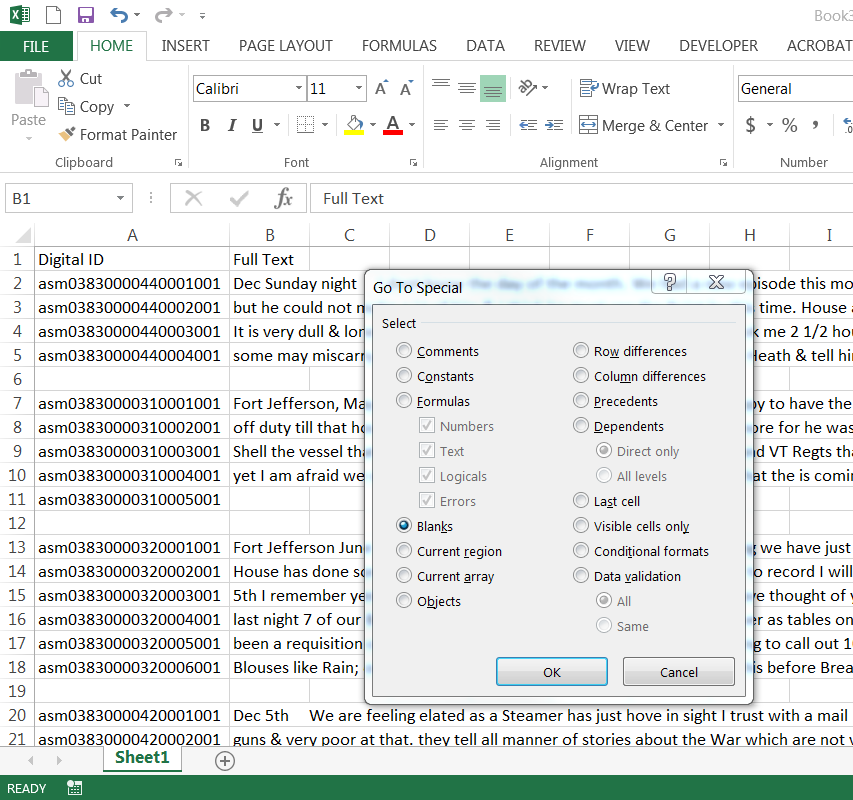
<p>Delete any rows without text in the Full Text column, using “Go To Special”</p>

<p><img src="/images/2018/ExcelGoToSpecial.png" alt="Screenshot of Excel 'Go To Special' dialog box" /></p>

<p>To save each row as its own text file, I used a quick macro that I adapted from responses to a <a href="https://stackoverflow.com/questions/13077740/create-text-files-from-every-row-in-an-excel-spreadsheet">Stack Overflow question</a>. The macro saves each cell in Column B as a txt file, with the value of Column A as the filename:</p>
<blockquote><span style="color: #333333;"><strong>Sub savemyrowsastext()</strong></span>

<span style="color: #333333;"><strong>Dim saveText As String</strong></span>
<span style="color: #333333;"><strong>  </strong></span>
<span style="color: #333333;"><strong> For Each cell In Sheet1.Range("A1:A" &amp; Sheet1.UsedRange.Rows.Count)</strong></span>
<span style="color: #333333;"><strong>     saveText = cell.Text</strong></span>
<span style="color: #333333;"><strong>     Open "C:\Users\ewilliams\Desktop\" &amp; saveText &amp; ".txt" For Output As #1</strong></span>
<span style="color: #333333;"><strong>     Print #1, cell.Offset(0, 1).Text</strong></span>
<span style="color: #333333;"><strong>     Close #1</strong></span>
<span style="color: #333333;"><strong> Next cell</strong></span>

<span style="color: #333333;"><strong>MsgBox ("Done")</strong></span>

<span style="color: #333333;"><strong>End Sub</strong></span></blockquote>
<p>Ta-dah!  Now you have text files for each page/image in CONTENTdm!</p>

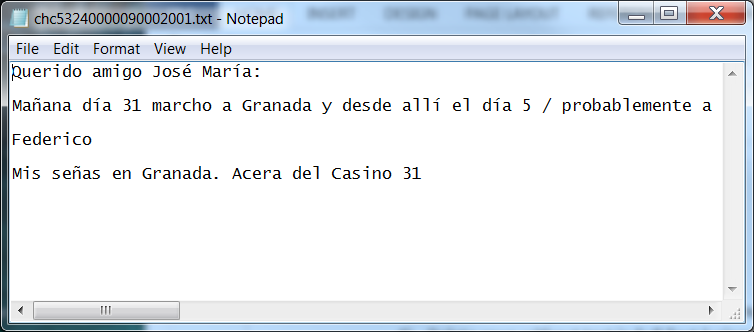
<p>In looking through the text files, though, I realized that the line breaks in the transcriptions got lost in the process.  (I suspect CONTENTdm doesn’t output the line breaks in the metadata at all, which makes sense.)  I wanted those line breaks, though, since they were present in the transcriptions in CONTENTdm, and help make the transcriptions more user-friendly.</p>

<p>Looking at the files, I discovered that in the exported metadata, what showed up in the CONTENTdm front-end as two line breaks was turned into four blank spaces.  I can’t guarantee that is how CONTENTdm will always export that, but it was in my case.</p>

<p>Well, that should be easy enough to fix en masse using the command line.  After googling around and testing various ways of manipulating text files on the command line, I settled on using the <a href="https://www.computerhope.com/unix/used.htm">sed command</a>. (Various attempts to use the tr command or perl didn’t work, for reasons I wasn’t willing to put the time into figuring out.) I did a little more research/refreshing on how to encode <a href="https://en.wikipedia.org/wiki/Newline">newline characters</a>, and ended up with this:</p>
<blockquote><strong>sed –i ‘s/    /\r\n\r\n/g’ *.txt</strong></blockquote>
<p>It’s worth noting that sed only works on a bash shell (I use Git Bash).  It’s also a good idea to make backups of the text files before running this, just in case something goes wrong (although you could always just re-export them from the Excel file).</p>

<p><img src="/images/2018/finishedProduct.png" alt="Screenshot of a Notepad file with the extracted OCR text from a letter" /></p>

<p>So that’s it.  Relatively straight-forward, although as I mentioned, I’m sure there are quicker/cleaner ways to do it.  I’d love to hear any feedback or suggestions for how to improve this process!</p>]]></content><author><name>admin</name></author><category term="command line" /><category term="contentdm" /><category term="excel" /><category term="metadata" /><summary type="html"><![CDATA[This week, we had a case at my library where we wanted to extract the full-text field for a few of our digital collections and save it as a separate text file for each image.  Normally, we create text files for images by running OCR on them outside of CONTENTdm.  But for a few collections, transcriptions were manually created and entered into the Full Text field directly in CONTENTdm.  We wanted to transfer those transcriptions from the CONTENTdm metadata to plain text files that we can preserve separately, both as a backup and in preparation for a future migration.]]></summary></entry><entry><title type="html">Archivalfeelings Metadata History Connection</title><link href="http://elliotdwilliams.github.io/archivalfeelings-metadata-history-connection/" rel="alternate" type="text/html" title="Archivalfeelings Metadata History Connection" /><published>2017-09-28T20:58:00+00:00</published><updated>2017-09-28T20:58:00+00:00</updated><id>http://elliotdwilliams.github.io/archivalfeelings-metadata-history-connection</id><content type="html" xml:base="http://elliotdwilliams.github.io/archivalfeelings-metadata-history-connection/"><![CDATA[<p>Earlier this summer, I had an experience where a collection that I was creating metadata for had a really strong emotional impact on me. It felt really significant, and made me think about the ways that I relate to collections that I work with. I tweeted about the experience at the time, and I’ve collected those tweets here.
<!--more--></p>

<p><em>[Updated June 2018: Originally, this post had an embedded Storify with all of the tweets.  Now that Storify is no more, you have to go to Twitter to read the thread.]</em></p>

<p>Thread:
<a href="https://twitter.com/elliot_dw/status/900115599019343873">https://twitter.com/elliot_dw/status/900115599019343873</a></p>
<blockquote class="twitter-tweet"><p lang="en" dir="ltr"><a href="https://twitter.com/hashtag/archivalfeelings?src=hash&amp;ref_src=twsrc%5Etfw">#archivalfeelings</a>, a thread about metadata and history and connection:</p>&mdash; Elliot D. Williams (@elliot_dw) <a href="https://twitter.com/elliot_dw/status/900115599019343873?ref_src=twsrc%5Etfw">August 22, 2017</a></blockquote>

<p>And the update with the digital collection link:
<a href="https://twitter.com/elliot_dw/status/903354735452880896">https://twitter.com/elliot_dw/status/903354735452880896</a></p>
<blockquote class="twitter-tweet"><p lang="en" dir="ltr">The slides of Félix González-Torres&#39; work that I was talking about in this thread are online now: <a href="https://t.co/9KDTerIpjA">https://t.co/9KDTerIpjA</a> <a href="https://t.co/VBmEUnBEK5">https://t.co/VBmEUnBEK5</a></p>&mdash; Elliot D. Williams (@elliot_dw) <a href="https://twitter.com/elliot_dw/status/903354735452880896?ref_src=twsrc%5Etfw">August 31, 2017</a></blockquote>]]></content><author><name>admin</name></author><category term="archives" /><category term="emotions" /><category term="metadata" /><summary type="html"><![CDATA[Earlier this summer, I had an experience where a collection that I was creating metadata for had a really strong emotional impact on me. It felt really significant, and made me think about the ways that I relate to collections that I work with. I tweeted about the experience at the time, and I’ve collected those tweets here.]]></summary></entry><entry><title type="html">MARC history timeline</title><link href="http://elliotdwilliams.github.io/marc-history/" rel="alternate" type="text/html" title="MARC history timeline" /><published>2017-07-08T15:37:00+00:00</published><updated>2017-07-08T15:37:00+00:00</updated><id>http://elliotdwilliams.github.io/marc-history</id><content type="html" xml:base="http://elliotdwilliams.github.io/marc-history/"><![CDATA[<p>I’m working on a handful of projects about the history of MARC, and one of the things that would be really useful to me is a good, concise history of the family of MARC formats. I haven’t been able to find quite what I’m looking for, so I decided to make it!
<!--more--></p>

<p>The timeline below is my first, very imperfect attempt at mapping out the big markers in the history of MARC.  A couple of caveats: it is very much the result of my interests and my knowledge (other people would likely highlight other milestones); it is very US-centric (given my familiarity with and interest in MARC21 and USMARC); it is incomplete (I know it is missing things, and hopefully I will add to it over time). I also don’t love this timeline format, but I decided to use this simple but unlovely Wordpress plugin until I find something better.</p>

<p>I’d love feedback, suggestions, criticism, etc.  Tell me what I’ve forgotten, point me to other sources, correct me on things I got wrong!  But in the meantime, please enjoy the history of our goofy but lovable data format.</p>

<hr />

<p>Color code: <span style="color: #000080;">blue is general policy and history</span>; <span style="color: #008000;">green is bibliographic format</span>; <span style="color: #800000;">red is all other formats</span>; <span style="color: #ff9900;">yellow is format integration</span>.</p>

<p>[svtimeline]</p>

<p>[svt-event title=”CLR report on automation at Library of Congress” date=”1963” class=”svt-cd-blue” ] [/svt-event]</p>

<p>[svt-event title=”MARC Pilot Project (MARC I)” date=”1965-1968” class=”svt-cd-green” ] [/svt-event]</p>

<p>[svt-event title=”MARC II introduced at ALA” date=”1967-07” class=”svt-cd-green” ] [/svt-event]</p>

<p>[svt-event title=”LC releases specification for MARC II” date=”1967-08” class=”svt-cd-green” ] [/svt-event]</p>

<p>[svt-event title=”MARC II operational” date=”1969-03” class=”svt-cd-green” ] [/svt-event]</p>

<p>[svt-event title=”Serials and maps formats released” date=”1970” class=”svt-cd-green” ] [/svt-event]</p>

<p>[svt-event title=”Film format released” date=”1971” class=”svt-cd-green” ] [/svt-event]</p>

<p>[svt-event title=”Original manuscript and music formats released” date=”1973” class=”svt-cd-green” ] [/svt-event]</p>

<p>[svt-event title=”MARBI takes on role of MARC Advisory Committee” date=”1973” class=”svt-cd-blue” ] [/svt-event]</p>

<p>[svt-event title=”MARC Authorities Format published” date=”1976” class=”svt-cd-red” ] [/svt-event]</p>

<p>[svt-event title=”Review based on publication of AACR2” date=”1978-1979” class=”svt-cd-green” ] [/svt-event]</p>

<p>[svt-event title=”Bibliographic formats published together as <em>MARC Format for Bibliographic Data</em> (MFBD)” date=”1980” class=”svt-cd-yellow” ] Each field had “validity designators” for different forms of material. [/svt-event]</p>

<p>[svt-event title=”<em>The USMARC Principles: The Underlying Principles</em> published” date=”1982” class=”svt-cd-blue” ] [/svt-event]</p>

<p>[svt-event title=”Format integration broadly undertaken” date=”1983-1988” class=”svt-cd-yellow” ] [/svt-event]</p>

<p>[svt-event title=”USMARC Format for Holdings Data published” date=”1984” class=”svt-cd-red” ] First edition [/svt-event]</p>

<p>[svt-event title=”Format Integration guiding principles published at MARBI Midwinter meeting” date=”1984” class=”svt-cd-yellow” ] [/svt-event]</p>

<p>[svt-event title=”New edition of Authorities format published” date=”1987” class=”svt-cd-green” ] [/svt-event]</p>

<p>[svt-event title=”<em>Discussion Paper 16: Format Integration Considerations</em> released and discussed” date=”1987 (Spring/Summer)” class=”svt-cd-yellow” ] [/svt-event]</p>

<p>[svt-event title=”<em>Proposal 88-1 (Format Integration)</em> voted on and approved, with amendments, by USMARC Advisory Committee and later by LC” date=”1988 (Late Summer)” class=”svt-cd-yellow” ] [/svt-event]</p>

<p>[svt-event title=”USMARC Format for Bibliographic Data published, incorporating format integration changes” date=”1988” class=”svt-cd-green” ] [/svt-event]</p>

<p>[svt-event title=”New version of USMARC Format for Holdings Data published” date=”1989” class=”svt-cd-red” ] [/svt-event]</p>

<p>[svt-event title=”Provisional format for community information approved by MARC Advisory Committee” date=”1992” class=”svt-cd-red” ] [/svt-event]</p>

<p>[svt-event title=”New edition of USMARC Format for Authority Data published” date=”1993” class=”svt-cd-red” ] [/svt-event]</p>

<p>[svt-event title=”USMARC Format for Community Information published (first edition)” date=”1993” class=”svt-cd-red” ] [/svt-event]</p>

<p>[svt-event title=”New edition of USMARC Format for Bibliographic Data published” date=”1994” class=”svt-cd-green” ] [/svt-event]</p>

<p>[svt-event title=”USMARC and CAN/MARC communities work on integration” date=”1994-1997” class=”svt-cd-blue” ] [/svt-event]</p>

<p>[svt-event title=”Update No. 2 to 1994 edition of authority format published, bringing USMARC and CAN/MARC into alignment” date=”1997-03” class=”svt-cd-red” ] [/svt-event]</p>

<p>[svt-event title=”Update No. 3 to 1994 edition bibliographic format published, bringing USMARC and CAN/MARC into alignment” date=”1997-07” class=”svt-cd-green” ] [/svt-event]</p>

<p>[svt-event title=”MARC 21 published” date=”1999” class=”svt-cd-green” ] [/svt-event]</p>

<p>[svt-event title=”MARC 21 Format for Authority Data published” date=”1999” class=”svt-cd-red” ] [/svt-event]</p>

<p>[svt-event title=”MARC 21 Lite Bibliographic Format published” date=”1999-02” class=”svt-cd-green” ] [/svt-event]</p>

<p>[svt-event title=”MARC 21 Formats for Authority Data, Holdings Data, and Community Information published” date=”2000” class=”svt-cd-red” ] [/svt-event]</p>

<p>[svt-event title=”MARC 21 XML released” date=”2002-05” class=”svt-cd-green” ] [/svt-event]</p>

<p>[svt-event title=”British Library adopts MARC 21 to replace UKMARC” date=”2004-06” class=”svt-cd-blue” ] [/svt-event]</p>

<p>[svt-event title=”New edition of MARC 21 LITE Bibliographic Format published” date=”2006” class=”svt-cd-green” ] [/svt-event]</p>

<p>[svt-event title=”RDA/MARC Working Group formed” date=”2008” class=”svt-cd-blue” ] [/svt-event]</p>

<p>[/svtimeline]</p>

<p> </p>

<p><em>Sources</em></p>
<ul>
 	<li><a href="https://catalog.hathitrust.org/Record/002627586"><em>Format Integration and its Effect on the USMARC Bibliographic Format</em>, 1992 ed. (Washington: Library of Congress)</a></li>
 	<li><a href="https://www.loc.gov/marc/">Library of Congress. MARC21 format specifications.</a></li>
 	<li>McCallum, Sally H. (1990). "Format Integration : Handling the Additions and Subtractions." <em>Information Technology and Libraries</em>, 9(2), 155–161.</li>
 	<li>Seikel, Michele, &amp; Steele, Thomas (2011). "How MARC Has Changed: The History of the Format and Its Forthcoming Relationship to RDA." <em>Technical Services Quarterly</em>, 28(3), 322–334. https://doi.org/10.1080/07317131.2011.574519</li>
</ul>]]></content><author><name>admin</name></author><category term="cataloging" /><category term="Cataloging" /><category term="data formats" /><category term="history" /><category term="Library of Congress" /><category term="MARC" /><summary type="html"><![CDATA[I’m working on a handful of projects about the history of MARC, and one of the things that would be really useful to me is a good, concise history of the family of MARC formats. I haven’t been able to find quite what I’m looking for, so I decided to make it!]]></summary></entry><entry><title type="html">Controlling all the names with OpenRefine</title><link href="http://elliotdwilliams.github.io/controlling-all-the-names/" rel="alternate" type="text/html" title="Controlling all the names with OpenRefine" /><published>2016-02-29T03:58:00+00:00</published><updated>2016-02-29T03:58:00+00:00</updated><id>http://elliotdwilliams.github.io/controlling-all-the-names</id><content type="html" xml:base="http://elliotdwilliams.github.io/controlling-all-the-names/"><![CDATA[<p><span style="font-weight: 400;">I’m trying to get better at writing out the process for things that I do in my day-to-day metadata work. Mostly, I want to do this for my own personal use - to help me think through my processes more clearly, and to have something to refer back to the next time I want to do something similar.  But I’m also aware of how valuable I find other metadata librarians’ descriptions of the work that they do, so I’m going to post this kind of process-oriented writing here on my blog.  If you read this and have thoughts, questions, suggestion, I’d love to talk about it with you!</span>
<!--more--></p>

<p><span style="font-weight: 400;">Last month, we finalized the metadata for some additions to a <a href="http://merrick.library.miami.edu/cubanHeritage/theater/" target="_blank" rel="noopener">large digital collection of material about Cuban and Cuban-American theater</a></span><span style="font-weight: 400;">.  This particular collection has multiple different fields for creators and contributors (e.g. author, director, cast, costume designer, etc.).  Additionally, this collection has been on-going for several years, meaning many people have created metadata for it.  Now seemed like a good time to exert some authority control on the names in those various creator and contributor fields, doing some standardization and normalization of names.  We use the authorized form of names from LCNAF, for names that have authority records, so my goal was to make sure that all names with LC records used the authorized form, and for all other names, to use one consistent form across all of the fields.</span></p>

<p><img src="https://media2.giphy.com/media/v1.Y2lkPTc5MGI3NjExeHczcDNzaWo3ZXp5b3pnemN6am5qdGd4YThzZXZ4NWY3OXhod3gwOCZlcD12MV9pbnRlcm5hbF9naWZfYnlfaWQmY3Q9Zw/IZnTvNiCvlmSc/giphy.webp" alt="Gif of Aaron Burr from &quot;Hamtilton&quot; saying &quot;What's your name, man?&quot;" /> <em>Aaron Burr really cares about name authorities.</em></p>
<p><span style="font-weight: 400;">CONTENTdm, which we use to host our digital collections, has an option for individual metadata fields to be set as a “controlled vocabulary,” meaning that we can define a list of terms that are considered valid for that field.  Setting the fields I wanted to work on for this project as controlled, with the existing contents of the field used as the list of approved terms, meant that I was able to export a text file for each field with all of the terms it contains. CONTENTdm saves those files on its server, </span><span style="font-weight: 400;">so I was able to easily use FileZilla to download the text files for the 13 fields in question.  </span></p>

<p><span style="font-weight: 400;">I wanted to combine those 13 lists of names into a single list, but add a second column with the original filename, so I could track which names came from which fields. A little googling, and a suspicion that this should be easy to do on the command line, brought me <a href="https://community.spiceworks.com/topic/322603-merge-csv-files-and-create-a-column-with-the-filename-from-the-original-file" target="_blank" rel="noopener">here</a></span><span style="font-weight: 400;">, and I adapted the script slightly for my purposes: </span><em><span style="font-weight: 400;">for /f %a in (‘dir /b <em>.txt’) do for /f “tokens=</em>” %b in (%a) do echo %b;%a &gt;&gt; all.txt</span></em></p>

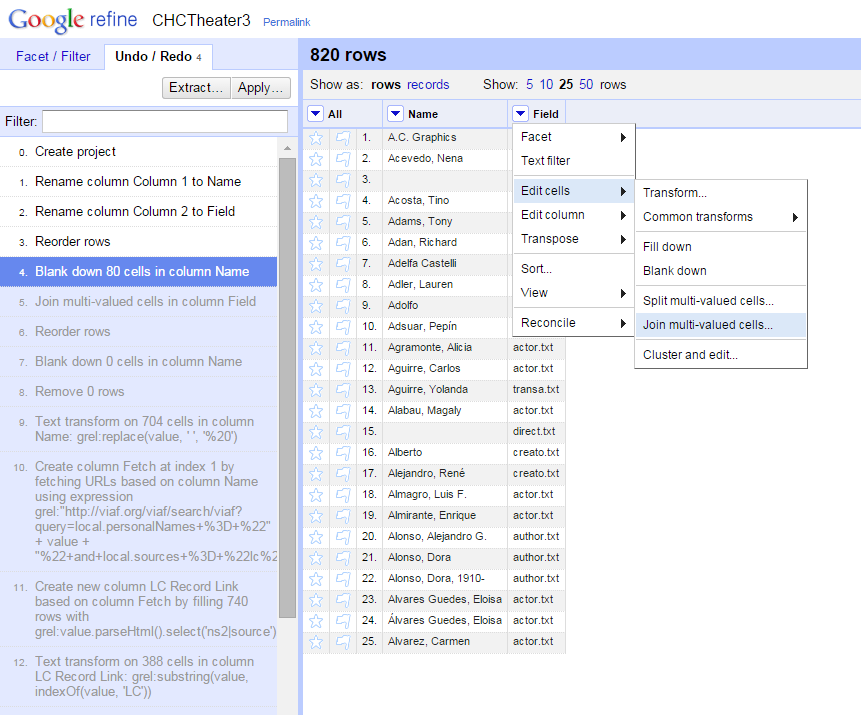
<p><span style="font-weight: 400;">Tah-dah! I now had a semicolon delimited file with columns for the Name and Field. The next step was to de-dupe that list - I needed to find names that were in multiple fields, combine the values from the Field column into one cell, and remove the duplicates. I tried to do this in Exel, and it was a struggle. I briefly considered writing a macro to do it before giving up and doing it manually.  I’m glad I didn’t waste a lot of time on a macro for it, because I later realized that it was very simple to do in OpenRefine (thanks to reading Ruth Tillman’s <a href="http://journal.code4lib.org/articles/11179" target="_blank" rel="noopener">excellent article in the most recent Code4Lib</a>).  The way to do it in OpenRefine, for future reference, is: </span></p>
<ul>
 	<li style="font-weight: 400;"><span style="font-weight: 400;">Sort by Name, and select “Reorder Permanently” in the Sort menu</span></li>
 	<li style="font-weight: 400;"><span style="font-weight: 400;">In the Name column menu, under Edit Cells, select “Blank Down”.  </span></li>
 	<li style="font-weight: 400;"><span style="font-weight: 400;">In the Field column menu, under Edit Cells, select “Join multi-valued cells”.  That will combine all of the values into one cell, using a selected character as a delimited.</span></li>
</ul>

<p><img src="/images/2016/OpenRefine_JoinMultiValue.png" alt="Screenshot of OpenRefine joining multi-value cells" /> <em>So much easier than an Excel macro</em></p>

<p><span style="font-weight: 400;">Okay, now the fun part: I had a list of 740 names and what fields they were found in, so I wanted to: </span></p>
<ol>
 	<li style="font-weight: 400;"><span style="font-weight: 400;">Reconcile the list of names against LCNAF to make sure we are using the authorized form, if there is one, and</span></li>
 	<li style="font-weight: 400;"><span style="font-weight: 400;">Identify variant forms of the same name, particularly those that aren’t established in LC.</span></li>
</ol>
<p><span style="font-weight: 400;">Fortunately, OpenRefine can help with both of those things!</span></p>

<p><span style="font-weight: 400;">I tackled reconciliation against LCNAF first.  I’d previously tested out a <a href="https://github.com/codeforkjeff/refine_viaf" target="_blank" rel="noopener">VIAF reconciliation service</a> developed by Jeff Chiu</span><span style="font-weight: 400;">, and had good luck with it.  It’s fast, and seems to return good results.  I copied the list of names to a new column in Refine, and ran the reconciliation service on that column.  After running the reconciliation, I went through quite a few names that had potential matches and manually confirmed (or not) the match, particularly for names that didn’t have qualifiers like dates.  I ended up with 98 names that were matched to LC authority records.  I created a new column, with only the names that were reconciled with VIAF, using the GREL expression </span><span style="font-weight: 400;"><em>cell.recon.match.name</em>.</span></p>

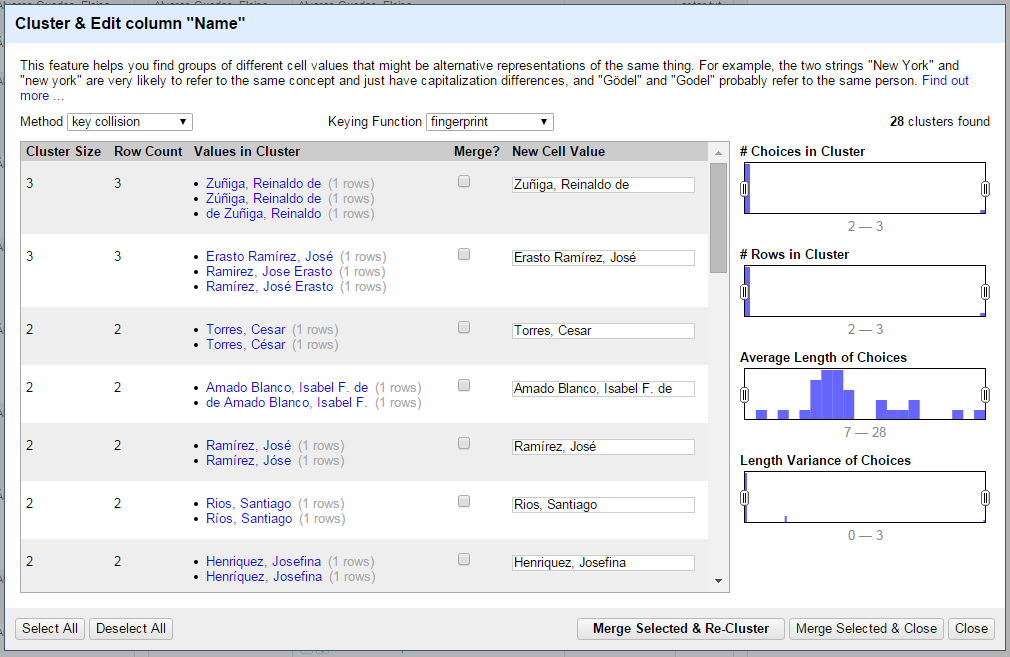
<p><span style="font-weight: 400;">My next step was to use the clustering function in Refine to identify potential variants of the same name. I knew there were a lot of potential variants: names missing dates, missing diacritics (or extraneous diacritics), typos, etc. I briefly tried to do this work myself, and quickly realized it was extremely difficult to do. But the power of algorithms came to my rescue! I created another new column of names, and used OpenRefine’s “Cluster and edit” function on it (found under Edit Cells). The clustering function identifies potential variants that represent the same thing and lets you quickly edit them all to one version (or to something else altogether). I tried out various methods of clustering, and found that they caught different potential variants. For each cluster, I chose the correct form and edited the cells to include it. In many cases, this involved going back to the items themselves to verify if, for example, this person used an accent mark. This was a time-consuming process (possibly the most time-consuming single step), because it involved so much looking back at the materials to determine the correct form.  However, it wasn’t difficult, and it was SO much easier than if I’d tried to do the matching by hand.</span></p>

<p><img src="/images/2016/OpenRefine_Cluster.png" alt="Screenshot of OpenRefine performing clustering" /> <em>Diacritics gone wild</em></p>

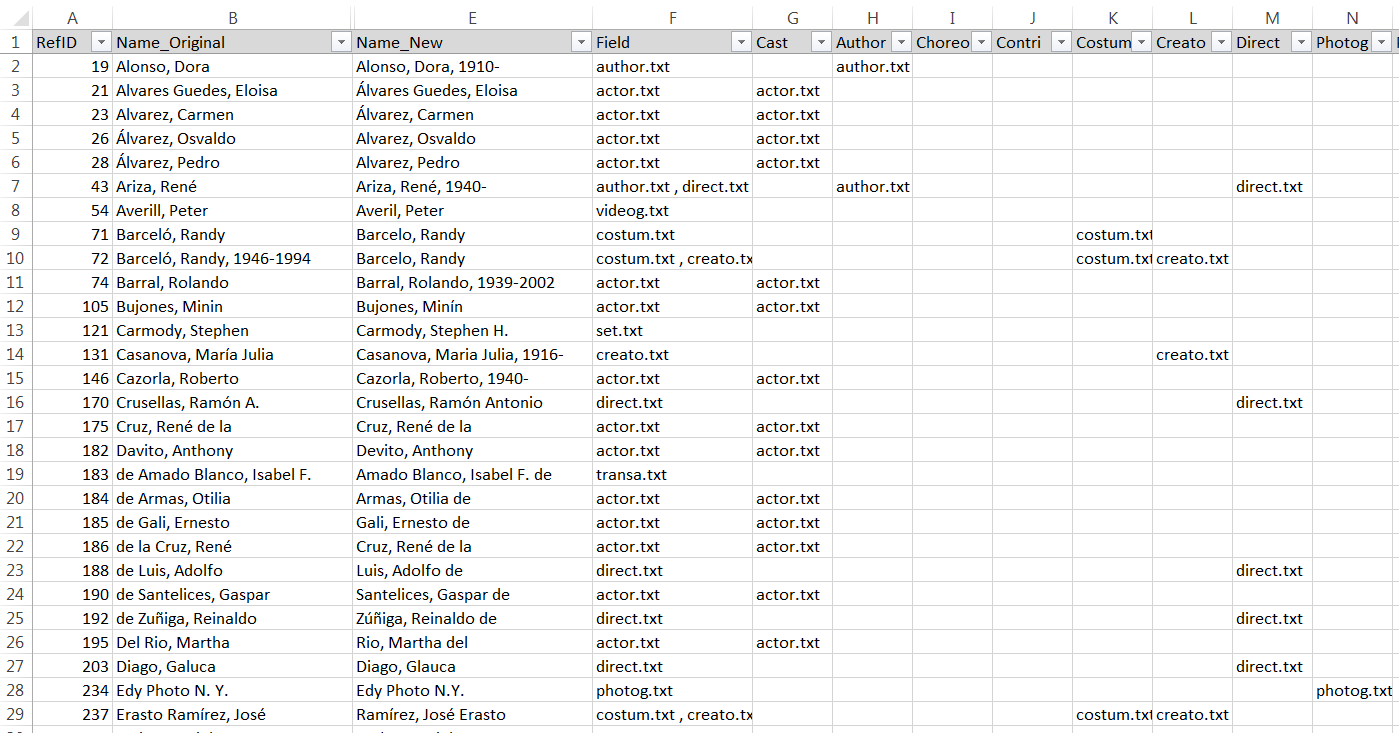
<p><span style="font-weight: 400;">With all of the reconciliation and clustering done, I had my list of names that needed to be edited. I exported the project out of Refine and back into Excel, with colums for the original name, the reconciled name, and the clustered name. I used some IF(ISERROR(MATCH())) formulas to see if the original name matched the values in the reconciled and clustered name columns, and from there was able to separate out the names to be changed.  I ended up with a total of 88 names.  I then added columns for each original field to indicate if the name was found in that field, allowing me to filter for the names to change in each field.</span></p>

<p><img src="/images/2016/Excel_ListToChange.png" alt="Screenshot of Excel list of names" /> <em>Look at all those names to be updated!</em></p>

<p><span style="font-weight: 400;">Last but not least, I went into CONTENTdm and, field by field, edited the controlled vocabulary and used the built-in “Find and replace” tool to update the names that needed to be changed.  Because I had a well-organized list of what names needed to be changed in each field, I was able to move through this step fairly quickly. </span></p>]]></content><author><name>admin</name></author><category term="authority control" /><category term="metadata" /><category term="OpenRefine" /><category term="technology" /><category term="work" /><summary type="html"><![CDATA[I’m trying to get better at writing out the process for things that I do in my day-to-day metadata work. Mostly, I want to do this for my own personal use - to help me think through my processes more clearly, and to have something to refer back to the next time I want to do something similar.  But I’m also aware of how valuable I find other metadata librarians’ descriptions of the work that they do, so I’m going to post this kind of process-oriented writing here on my blog.  If you read this and have thoughts, questions, suggestion, I’d love to talk about it with you!]]></summary></entry></feed>